
Votre panier est vide










Toner Cartridge Guide
Compatible Brother TN760 Toner Cartridge: The Complete Guide
Budget-Friendly. High-Yield. Reliable.
Everything you need to know before buying a compatible TN760 toner — yields, compatibility, setup, and maintenance.
- Free ShippingOn orders over $46
- 24-Month WarrantyReplace or refund
- 30-Day ReturnsEasy and free
- Secure CheckoutSSL protected
Running out of black toner right in the middle of a hectic workday can completely derail your office momentum. One minute you're finalizing a crucial business report, and the next, your printer goes dark. A compatible Brother TN760 toner cartridge offers an excellent, budget-friendly alternative to expensive original equipment manufacturer (OEM) supplies. Before hitting the checkout button, take a quick minute to look over page yields, verify your exact printer model, and check the cartridge features so you get the absolute best value for your setup.
Think about it this way: a lower price tag shouldn't mean dealing with constant error messages. By knowing what to look for upfront, you can keep your monochrome laser printer running smoothly without overspending.
Three Reasons to Consider the TN760
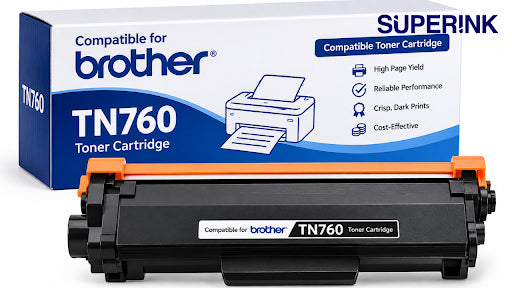
- High-Volume Capacity: Super Ink lists a yield of up to 3,000 pages for this high-yield cartridge, making it worth considering for offices with regular printing needs.
- Zero Hassle Setup: The current cartridge option comes with a pre-installed smart chip. This saves you the extra step of transferring a chip, though printer compatibility should still be checked before installation.
- Crisp Everyday Prints: It is designed for everyday black-and-white documents, including invoices, business reports, and multi-page forms.
What Is a Compatible Brother TN760 Toner Cartridge?
The TN760 is a high-yield black toner cartridge, and a Brother TN760 high yield compatible option can offer a budget-friendly alternative for supported Brother monochrome laser printers. A "compatible" cartridge is a brand-new unit built by a third-party manufacturer rather than the original brand. It is designed for compatible printer models and may offer a lower-cost alternative to an original Brother cartridge.
While saving money is great, don't let a cheap price be your only guide. You still want to check the manufacturer's rated yield, look over the list of supported printers, ensure the smart chip is present, and look for solid warranty coverage.
What Super Ink offers: The current compatible TN760 listing features a listed yield of up to 3,000 pages, an attached chip, and 24-month warranty coverage alongside hassle-free returns. Be sure to look over the live product page to verify real-time stock levels and localized terms before completing your checkout.
TN760 vs. TN730: Which Should You Choose?
Some printer models support both cartridges, but compatibility depends on the specific printer. Check your model before choosing between them.
| Feature | TN760 | TN730 |
|---|---|---|
| Genuine cartridge type | High yield | Standard yield |
| Genuine Brother rated yield | Approx. 3,000 pages | Approx. 1,200 pages |
| Suitable printing habits | Frequent printing | Lighter printing needs |
| Main consideration | Higher rated capacity | Standard-yield option |
Note: These yield numbers reflect official estimates for genuine name-brand cartridges under laboratory testing conditions. Independent third-party yields will vary based on the specific brand you choose.
If your office churns through paperwork daily, opting for the high-yield TN760 can reduce how often you need to replace depleted toner cartridges. The standard TN730 is fine if you only print a few pages a week. If you're considering a compatible Brother TN760 toner, check the listed page yield and printer compatibility before ordering.
Is a TN-760 Black Toner with Chip Right for You?
A pre-installed chip can simplify installation, provided the cartridge is compatible with your printer. The chip helps the printer recognize the cartridge and communicate cartridge-related information. However, just because a chip is attached doesn't mean it will magically work in every single machine.
Before finalizing your purchase, confirm these three details:
- Your specific machine model is explicitly written out in the compatibility list.
- The product header clearly states that the smart chip is built-in.
- The store offers clear return windows and warranty protections in case you run into an issue.
Which Printers Use TN760 Toner?
Ordering the wrong toner cartridge can be frustrating and costly. To save yourself a trip back to the post office, double-check that your machine matches one of these supported models listed by Super Ink:
- Brother HL Series: HL-L2350DW, HL-L2370DW, HL-L2370DWXL, HL-L2390DW, and HL-L2395DW
- Brother MFC Series: MFC-L2710DW, MFC-L2730DW, MFC-L2750DW, and MFC-L2750DWXL
- Brother DCP Series: DCP-L2550DW
Whether you are looking for a specific Brother HL-L2350DW toner or Brother MFC-L2710DW toner, take five seconds to match the full alphanumeric string on the front of your printer. Model suffixes can indicate differences between printer versions, so confirm cartridge compatibility using the full model number.
If you don't see your specific machine listed, look up your original user manual or check the manufacturer's site instead of taking a blind guess.
How to Replace Your TN760 Toner
Once you have verified the match, swapping out the old tank is a straightforward process:
- Pop the Front Cover Open up the main access door on the printer. Give it a moment to cool down if you've been running large jobs.
- Slide Out the Cradle Grab the central handle and firmly pull out the combined toner-and-drum assembly.
- Release the Empty Tank Press down on the small colored lock lever on the side of the drum unit to pop the old toner cartridge free. Be careful not to touch the shiny green roller surface on the drum.
- Prep the New Supply Remove all protective plastic shields, orange clips, and tape from your fresh cartridge.
- Click it Into Place Push the new toner cartridge firmly into the drum cradle until you hear it click home. Slide the whole assembly back into the machine and snap the door shut.
- Run a Test Print Print a test page to check whether the printer recognizes the cartridge and produces clear text.
How to Get More from Your Toner
Stated page capacities are solid guidelines, but your real-world mileage will depend heavily on what you print and how your machine is set up. Try these quick adjustments to reduce toner consumption:
- Turn on "Toner Save Mode" inside your printer settings for everyday internal drafts.
- Use the print preview function to cut out blank pages or unnecessary text blocks before hitting print.
- Store your backup cartridges flat in their original sealed boxes inside a cool, dark cabinet.
Vertical white lines or repeating marks can have several causes, including toner or drum issues. Check your printer's troubleshooting guidance before replacing a component.
Where to Buy TN760 Toner in Canada
When you are weighing your choices for a TN760 toner Canada supplier, prioritize value over the rock-bottom cheapest price. Factor in shipping speeds, return policies, real warranties, and whether the chip is included.
Super Ink supplies its premium compatible TN760 cartridges directly through its online portal. Head over to the official product space to double-check real-time pricing and verify availability before you buy.
Ready to order your TN760?
High-yield compatible Brother TN760 toner with pre-installed smart chip, 24-month warranty, and free shipping across Canada on orders over $46.
Shop Brother Toner Browse All TonerFrequently Asked Questions
Can I use a TN760 cartridge instead of a TN730?
Yes, provided your exact printer model supports both options. Always check your machine's official documentation before switching sizes.
Does this compatible version come with the chip?
Absolutely. The current inventory from Super Ink features a pre-installed smart chip so you don't have to fiddle with old components.
Do I need a new drum unit every time I swap toners?
Nope. Brother laser setups use a two-piece system consisting of a separate toner box and a drum frame. You will typically replace the toner cartridge several times before the drum unit finally wears out and needs to be retired.
How do I check which toner cartridge my printer takes?
Look at the sticker on the inside of the front access panel or check the front casing of your current empty cartridge. Match that number directly with the seller's verified compatibility layout.
Choose the Right Toner for Your Printer
The smart choice always comes down to your printing volume, machine type, and budget constraints. If you are hunting for a reliable compatible Brother TN760 toner kit, verify your machine code against the product checklist, confirm the warranty safety net, and check out with confidence. Taking a moment to verify these details can help you choose a cartridge suited to your printer and everyday printing needs.